AI coding tools should reach beyond the editor
What AI-assisted coding is
In traditional development, a developer translates intent into code by hand: you hold the goal in your head and type out the implementation. AI-assisted coding inserts a new layer into that path — you describe what you want in natural language, a tool turns that description into code, and you review and refine what comes back. Its loosest form has picked up the name “vibe coding,”1 but the mechanism underneath is the same: natural language becomes a primary interface to the codebase, mediated by a tool.
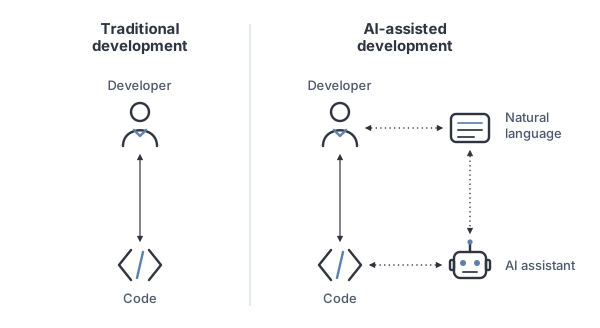
It’s a small change in the picture with a large change in practice. And, almost without exception, it is drawn inside the editor.
Development is more than coding
That picture quietly assumes the interesting work is writing code. Step back and look at what building software actually involves, and coding turns out to be one station on a larger loop.
Most development work circulates through three pillars:
- Project management — where work is planned, discussed, and documented: the roadmap, the features, the bugs. This is where intent is captured before any code exists.
- Coding — where that intent is implemented in the development environment.
- Infrastructure — where the code is shipped to production, run, and observed.
These aren’t a straight line; they’re a cycle. You plan and document a change on a project-management tool, move to the development environment to implement it, and push it to production — and what you learn there, a bug or a metric or a complaint, flows back into planning as the next piece of work.
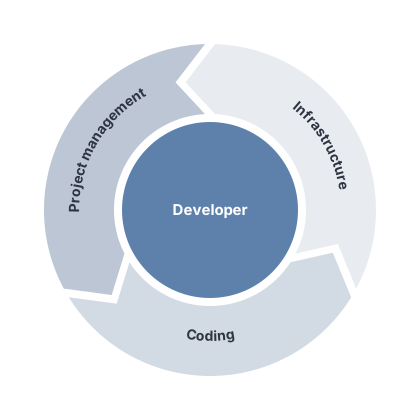
Each lap around this loop is one unit of real progress. Writing the code is the middle third.
Putting the assistant in the loop
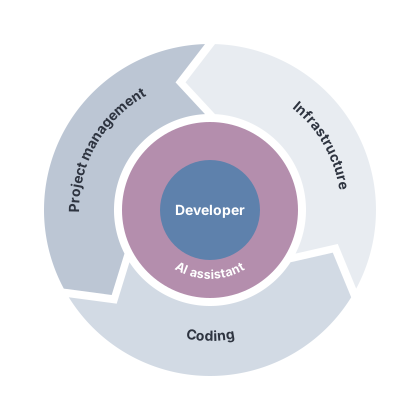
Now place the AI assistant on that map. Today it lives almost entirely in the coding pillar — inside the editor, helping write the next function. It is good at that, and the point here is not to evict it. The point is that confining it to one pillar leaves it blind to the other two, and therefore blind to whether its own work mattered.
AI-assisted coding already made natural language the interface to the codebase.2 Widen that same move to the whole loop and the assistant becomes the interface to development itself: you express intent once, and it carries that intent across all three pillars — opening the ticket, writing the code, shipping it, and reading back what production says. The developer still decides; the assistant becomes the layer they work through to reach the entire cycle, not a code generator confined to one station.
Coding
This is the pillar the assistant already occupies — directly in the development environment, whether through a command-line harness in the terminal or built into an editor like VS Code — and it is worth saying plainly that it works. Generating functions, refactoring, explaining unfamiliar code, writing tests — the assistant inside the editor has earned its place. The argument isn’t to leave the coding pillar. It’s to stop mistaking it for the whole job.
Project management
Code rarely exists for its own sake; it exists to satisfy something a human described in a project-management tool like Jira, Asana, or Trello — a ticket, an issue, a roadmap item. An assistant that can read and write the project-management layer can connect the change to its intent: pull the acceptance criteria from the ticket, draft the plan before touching code, update status as work progresses, and file the bug it just discovered instead of leaving it for someone to notice. The plan and the code stop drifting apart because the same participant is keeping both honest. The connection runs through the tools the team already uses: most expose a command-line interface, and a growing number ship a Model Context Protocol (MCP) server3 — an open standard for letting an assistant read and write an external system — so wiring the assistant in is increasingly configuration rather than custom glue.
Infrastructure
The most valuable thing an assistant can do is often not write code — it’s to close the loop on code that was written. That means being able to deploy, read logs, inspect running resources, and observe the effect of a change in the place where it actually matters. The difference between guessing from a diff and reading production is the difference between hoping a fix worked and knowing it did. The way in already exists: the major cloud providers — Google Cloud, AWS — ship comprehensive CLIs, so deploying, tailing logs, and inspecting resources are ordinary commands the assistant can run rather than bespoke integrations.
What closing the loop buys
Three disconnected tools — one for planning, one for coding, one for operations — force a human to be the integration layer between them, carrying state and handoffs across every boundary by hand. An assistant that spans all three carries that burden itself — and the span is also what lets it check its own work. An editor-bound tool proposes a change and stops; it cannot tell whether the deploy succeeded, whether the metric it targeted moved, or whether it just reintroduced last week’s bug. One that can see production can. The feedback that makes the loop a loop — reality reporting back — is exactly what the editor boundary cuts off.
Underneath this is a more basic fact about how these assistants work: an LLM is only as good as its context window — the working set of decisions, history, and current state it reasons over. Getting useful work out of one is, more than anything, the discipline of putting the right things in that window. The other two pillars aren’t only places to act; they’re the richest context the assistant could have. Project management holds the intent behind a change; infrastructure holds what the system actually does once it ships. The code says what was built — those pillars say why, and whether it worked. Confined to the editor, the assistant reasons with most of that evidence out of view.
That reach comes with a discipline attached. More context is not automatically better context — what matters is the signal-to-noise ratio inside the window, the problem now called context engineering.4 Widening the scope raises the supply of both: the connection that surfaces the decisive comment on a ticket can just as easily pull in ten stale ones, and the log lines that confirm a fix sit next to far more that say nothing. The goal isn’t to pour all three pillars into the context — it’s to draw the right slice from each at the right moment. Scope makes the right context reachable; it doesn’t relieve you of choosing it.
Risks and guardrails
Reaching into production and project-management tools is, of course, exactly where the blast radius lives. An assistant that can deploy can also break a deploy; one that can close tickets can also close the wrong one. And the danger isn’t spread evenly. A mistaken ticket edit is awkward but reversible; a mistaken production action may be neither. Infrastructure is where the irreversible lives — the dropped database, the bad deploy left running — which makes it the pillar that earns the strictest guardrails. The answer is not to retreat to the editor, where the tool is safe precisely because it is powerless. The answer is the same one we apply to human access: scoped permissions, a clear line between read and write, explicit confirmation before irreversible or outward-facing actions, and an audit trail of what was done. Designed well, those guardrails make broad reach safe; designed away, narrow reach only makes it useless.
The boundary is a choice
The editor boundary is a historical accident — where these tools happened to start, not where they have to stop. Development work is a loop across three pillars, and an assistant that participates in only one will always be helping with a third of the job while guessing at the rest. The trajectory worth building toward is an assistant that works across the whole cycle. The real constraint on that future is trust and control — not scope.
References
-
Karpathy, A. “There’s a new kind of coding I call ‘vibe coding’…”. X (2025). https://x.com/karpathy/status/1886192184808149383 ↩
-
Karpathy, A. Software Is Changing (Again). AI Startup School, Y Combinator (2025). https://www.youtube.com/watch?v=LCEmiRjPEtQ ↩
-
Anthropic. Introducing the Model Context Protocol. (2024). https://www.anthropic.com/news/model-context-protocol ↩
-
Anthropic. Effective Context Engineering for AI Agents. (2025). https://www.anthropic.com/engineering/effective-context-engineering-for-ai-agents ↩